
Saugi, patikima ir visada šalia
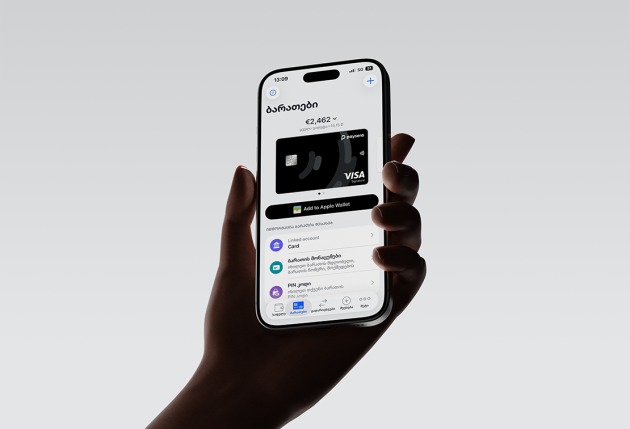
Kasdienės išlaidos, apsipirkimas internetu ar verslo valdymas visame pasaulyje – su Visa Premium viskas paprasčiau. Naudodami tiek skaitmeninę, tiek fizinę kortelę, patogiai tvarkykite savo finansus iš bet kurios pasaulio vietos. Viena kortelė – visoms jūsų reikmėms.



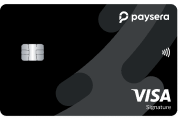
Visa Signature
Visa Signature – jūsų patogumui visame pasaulyje. Atsiskaitykite, keliaukite ir valdykite finansus sklandžiai, kad ir kur bebūtumėte.
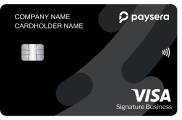
Visa Signature Business
Sukurta lyderiams, vertinantiems efektyvumą ir kontrolę. Visa Signature Business kortelė leidžia supaprastinti įmonės mokėjimus, keliauti protingiau ir apsaugoti tai, kas svarbiausia.

Viena kortelė viskam
Be vargo apsipirkite internetu, tvarkykite mokėjimus 22 valiutomis ir užsisakykite iki 10 papildomų kortelių šeimos nariams ar kolegoms. Visa tai valdykite patogiai iš savo telefono!

Pripažinta visame pasaulyje
Naudokite savo kortelę visur, kur priimama Visa. Atsiskaitykite ar išsiimkite grynuosius eurais ir kitomis valiutomis, mėgaudamiesi skaidriais valiutų keitimo kursais, be jokių paslėptų mokesčių.

Galimybė rinktis skaitmeninę arba fizinę
Aktyvuokite akimirksniu ir per kelias sekundes pridėkite kortelę prie „Apple Pay“, „Google Pay“ ar „Samsung Pay“. Fizinė ar skaitmeninė – jūsų kortelė visada paruošta naudoti.

Atskira IBAN sąskaita
Naudokitės specialia sąskaita, susieta su jūsų kortele. Laikydami ją atskirai nuo pagrindinės sąskaitos, galėsite tiksliai kontroliuoti išlaidas ir pervedimus.

Saugus ir patogus apsipirkimas internetu
Dviejų veiksnių autentifikavimas užtikrina operacijų saugumą. Pametus kortelę, galite ją akimirksniu užblokuoti savo programėlėje ir apsaugoti savo finansus.

Greitoji saugumo patikra oro uoste
Sutaupykite laiko didžiausiuose Europos, Turkijos, Sakartvelo ir kitų šalių oro uostuose. Tiesiog parodykite savo Visa Premium kortelę ir nestovėkite eilėse.

Daugiau nei 1 200 oro uosto poilsio kambarių
Atsipalaiduokite, dirbkite ar pavakarieniaukite patogiai naudodamiesi „Visa Airport Companion“ programėle ir „DragonPass“. Jums priklauso 10 apsilankymų per metus, o išleidus 5 000 GEL per pastarąsias 35 dienas – apsilankymų skaičius neribotas.

Asistento paslauga
Nuo išskirtinių viešbučių kainų ir nemokamų aukštesnės klasės kambarių iki automobilių nuomos ir kelionių planavimo – Visa Concierge padeda jums lengvai pasirengti bet kuriai kelionei.

Visapusiška kelionių apsauga
Keliaukite ramiai – draudimas padengia netikėtas situacijas, nuo vėlavimų ar pamesto bagažo iki nenumatytų nelaimių užsienyje.

Išskirtiniai pasiūlymai ir privilegijos
Mėgaukitės specialiosiomis nuolaidomis ir išskirtinėmis pramogomis – nuo viešbučių ir automobilių nuomos iki pramogų ir restoranų visame pasaulyje.
All the benefits of your Visa Signature card
A Premium card is more than just a way to pay. It's an experience that makes your everyday life easier and more enjoyable. See all the benefits of your Visa Signature card - www.visa.com.ge





Nuo ko pradėti?

Parsisiųskite Paysera programėlę.

Užsiregistruokite ir pabaikite identifikaciją.

Pasipildykite savo sąskaitą.

Information about Visa Card / Additional Information about Visa Card
Frequently Asked Questions
Anyone who becomes a Paysera customer and completes the identification/verification process can get a card.
How do I order a card?
-
Log in or create an account in the Paysera mobile application
-
Go to Cards
-
Review the rates and fees, then tap "+"
-
Fill in the details and order your card
Before ordering a card, make sure you have sufficient funds in your main Paysera account to cover the card order and delivery costs. Otherwise, please top up your account.
Getting and activating a digital card is completely free.
A user can order several cards linked to one additional account. The number of additional cards depends on the card type. When ordering a business card, it is required to provide the details(login name – email or mobile number) of the person/persons who will be using the card.
-
Log in to the Paysera mobile application
-
Go to Cards
-
Tap "Activate card"
-
Enter the CVV code
The card must be activated within 3 months of being issued.
-
Log in to the Paysera mobile application
-
Go to Cards
-
Select "Top up card"
-
Choose your current account, enter the amount, and confirm the transfer
If you do not have sufficient funds in your current account, you can top it up via bank transfer. To get the bank details needed for the transfer, follow these instructions: Log in to Paysera Online Bank > Accounts and Cards > Top up account.
-
Log in to the Paysera mobile application
-
Go to Cards
-
Tap "View card PIN"
-
Enter the CVV code
-
Log in to the Paysera mobile application
-
Go to Cards
-
Block the card – your card will be temporarily blocked; you can unblock it at any time
-
Cancel the card – your card will be permanently cancelled, and the card account will be closed
If you suspect your card has been lost or that someone else has access to it, block your card immediately. Do not share your card PIN or any other card details with anyone.
You can add your Paysera Visa Signature card to both Apple Pay and Google Pay digital wallets. To do so, after logging in to the application and navigating to Cards, a button will appear to add your card to a digital wallet.
The card can also be added to PayPal.
You can receive and use the Paysera Visa Signature card anywhere in the world where Visa cards are accepted. A digital card can be obtained and activated at any location within a few minutes. The delivery time and cost of a physical card depends on your chosen location and the type of courier service selected.