
SEAMLESS, SECURE, EVERYWHERE YOU NEED IT
Whether it's daily spending, online shopping, or managing your business worldwide, Visa Premium cards make life and work simpler. Enjoy digital and physical cards, effortless control, and global access – all in one place.



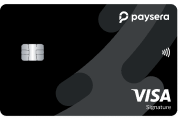
Visa Signature
For everyday comfort and global convenience. Visa Signature helps you pay, travel, and manage your finances smoothly – wherever you go.
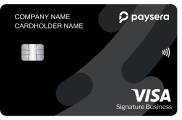
Visa Signature Business
Built for leaders who value efficiency and control. Visa Signature Business empowers you to simplify company payments, travel smarter, and protect what matters most.

One Card for Every Moment
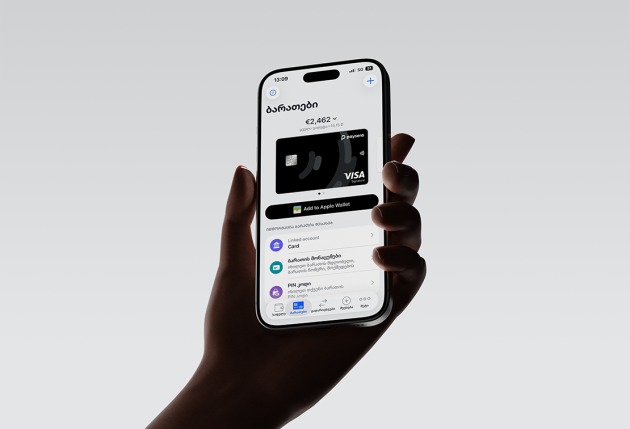
Shop online effortlessly, manage payments in 22 currencies and order up to 10 additional cards for family or colleagues – all from your phone.

Global Acceptance
Use your card anywhere Visa is accepted. Make purchases or withdraw cash in euros and other currencies with transparent exchange rates and no hidden fees.

Digital & Physical Flexibility
Activate instantly and connect with Apple Pay, Google Pay, or Samsung Pay in seconds. Whether physical or digital, your card is always ready to use.

Separate IBAN Account
Enjoy a dedicated IBAN linked to your card. Keep it separate from your main account and control exactly how much you spend or transfer.

Secure & Convenient Online Shopping
Two-factor authentication ensures safe transactions. Lost your card? Freeze or block it instantly from your app to prevent misuse.

Fast-Track Airport Access
Save time at major airports across Europe, Turkey, Georgia, and beyond. Simply show your Visa Premium card to skip queues and move ahead faster.

Access to 1,200+ Lounges Worldwide
Rest, work, or dine in comfort with the Visa Airport Companion app and DragonPass. Enjoy 10 visits per year – or unlimited with a 5,000 GEL spend in the past 35 days.

Travel Comfort & Concierge
From exclusive hotel rates and complimentary upgrades to car rentals and trip planning, Visa Concierge helps you prepare every journey with ease.

Comprehensive Travel Protection
Travel with peace of mind thanks to insurance that covers unexpected events, from trip delays to lost luggage or emergencies abroad.

Exclusive Offers & Rewards
Access curated discounts and premium experiences – from hotels and car rentals to entertainment and dining, both locally and internationally.
All the benefits of your Visa Signature card
A Premium card is more than just a way to pay. It's an experience that makes your everyday life easier and more enjoyable. See all the benefits of your Visa Signature card - www.visa.com.ge





Where do I start?




Information about Visa Card / Additional Information about Visa Card
Frequently Asked Questions
Anyone who becomes a Paysera customer and completes the identification/verification process can get a card.
How do I order a card?
-
Log in or create an account in the Paysera mobile application
-
Go to Cards
-
Review the rates and fees, then tap "+"
-
Fill in the details and order your card
Before ordering a card, make sure you have sufficient funds in your main Paysera account to cover the card order and delivery costs. Otherwise, please top up your account.
Getting and activating a digital card is completely free.
A user can order several cards linked to one additional account. The number of additional cards depends on the card type. When ordering a business card, it is required to provide the details(login name – email or mobile number) of the person/persons who will be using the card.
-
Log in to the Paysera mobile application
-
Go to Cards
-
Tap "Activate card"
-
Enter the CVV code
The card must be activated within 3 months of being issued.
-
Log in to the Paysera mobile application
-
Go to Cards
-
Select "Top up card"
-
Choose your current account, enter the amount, and confirm the transfer
If you do not have sufficient funds in your current account, you can top it up via bank transfer. To get the bank details needed for the transfer, follow these instructions: Log in to Paysera Online Bank > Accounts and Cards > Top up account.
-
Log in to the Paysera mobile application
-
Go to Cards
-
Tap "View card PIN"
-
Enter the CVV code
-
Log in to the Paysera mobile application
-
Go to Cards
-
Block the card – your card will be temporarily blocked; you can unblock it at any time
-
Cancel the card – your card will be permanently cancelled, and the card account will be closed
If you suspect your card has been lost or that someone else has access to it, block your card immediately. Do not share your card PIN or any other card details with anyone.
You can add your Paysera Visa Signature card to both Apple Pay and Google Pay digital wallets. To do so, after logging in to the application and navigating to Cards, a button will appear to add your card to a digital wallet.
The card can also be added to PayPal.
You can receive and use the Paysera Visa Signature card anywhere in the world where Visa cards are accepted. A digital card can be obtained and activated at any location within a few minutes. The delivery time and cost of a physical card depends on your chosen location and the type of courier service selected.